Facebook Ads Glossary of Terms
Here is a glossary of the most important terms to know to create and implement a Facebook Ads marketing strategy.
Ad
A Facebook ad is a type of post you create that relates to business goal you want to achieve. You pay Facebook to either boost this content so it shows to more people who follow your business or to target specific audiences you designate.
Ads always appear with the “sponsored” label under the page name:

Ad Attribution
When your ads display to your target audiences, Facebook has two ways of attributing actions they take to your ads. These are actions that occur on your ads directly and actions that are taken off your ads.
Examples of actions taken on your ad are a link click or video view.
Examples of actions taken off your ad are filling out a form or purchasing a product on your website.
There is an attribution window for actions taken off your ad, with the default set at a 1-day window for someone viewing your ad then acting, and a 28-day window for someone who clicked on the ad (if someone clicks on your ad then converts on your website within 28 days, that conversion is attributed to your ad).
You can edit attribution time-frames.
Ad Auction
Facebook ads use an auction system where the participant’s ads are targeted to eligible audiences. This means you are competing with other advertisers to get in front of your target audience.
The auction is won by ads with the highest value made up of bid, estimated action rates, and ad quality/relevance.
The best strategy is to focus on targeting, ad quality, and relevance rather than trying to outbid competitors. Your goal is to get the most exposure to the best audiences for the lowest cost.
Ad Recall Lift
Estimated ad recall lift is an estimation of how many people would remember seeing your ad if asked within two days. It’s a metric available with ads using the page post engagement objective.
You can target ad recall lift as a delivery optimization to display ads to people most likely to remember seeing your ad within two days.
Facebook uses behavior metrics and polling to get data on ad recall lift.
Ad Set
An ad set is a group of ads that share the same budget, schedule, delivery optimization and targeting. You can have multiple ad sets under one campaign (campaigns are where the goals and budgets are set).
You create different ad sets in a single campaign to split-test ad copy, images, and target audiences. When you run a campaign, the goal is to find the ads within your sets that perform the best to refine your audience targeting and ad content.
Algorithm
An algorithm is a series of steps for solving a problem. The Facebook advertising system is run by a powerful computer algorithm. Its primary function is to analyze data on user behavior with the goal of targeting ads so they reach the right audiences.
The Facebook algorithm decides how to display your ads and use your budget. It correlates data from the billions of Facebook users to maximize the results of your ads.
You don’t need to understand the technology behind how algorithms work, but you do need to be aware that this tool plays a big role in how your content is delivered. Part of your strategy will be to let Facebook “find” the best audiences for your ads to optimize their delivery.
Audience
An audience is a group of people you target on Facebook who can potentially see your ad. You designate audience targets in your ad sets.
You can create new audiences based on a variety of targets that include interests and demographics. You can also target saved audiences you’ve previously used or that are from retargeting or lookalike lists.
Facebook’s algorithm plays a large role in targeting audiences, refining targets through its learning phase.
Audience Insights
Audience Insights is a tool in ads manager used to create new audiences based on demographics and interests.
This tool is particularly useful for researching topics or people that have active audiences on Facebook. Based on those interests, you can target audiences that are likely to respond to your ads.
Learn more about Audience Insights.
Audience Network
The audience network is an ad targeting option for a network of mobile app and mobile web publishers who’ve been approved by Facebook to show ads in their apps.
When you manually edit placements for an ad set, you have the option of showing ads on the audience network. Automatic placements will run your ads in the audience network.
Automatic Placements
Automatic placements is an ad delivery option where you allow Facebook to run your ads across their network of apps and services. This gives the delivery system more flexibility to target ads where they get the best results.
Because the Facebook algorithm is so effective at targeting ads, automatic placements is the default recommendation. However, if you know you’ll get better results by targeting your ads, you can do that manually.
Budget
Budget is the maximum you’re willing to spend on your ads. You can set this as an average daily budget or over the lifetime of scheduled ads.
In 2019 and moving forward budgets will be set at the campaign level. The algorithm will distribute your campaign budget across ad sets to optimize results.
Campaign
A Facebook campaign is a group of ad sets with a unified goal and budget.
Campaigns are associated with specific business objective, such as creating brand awareness or generating leads.
You test ad groups and ads within the campaign to discover what audiences and collateral are most effective at completing your goal.
The Facebook algorithm will distribute your budget across ad sets and favor the ones that drive results.
Cost (Per Action)
Facebook ads are all associated with some type of cost related to an action the user takes.
The most commonly known of these is pay per click. For example, your ad can have a call to action button users click on that takes them to your website. Your advertising cost for that campaign is how much each of those clicks costs you.
You can also set up based on what it costs to reach 1000 people (CPM); this type of campaign targets awareness goals.
Cost per video view is based on the length of time someone watches your video. For example, cost per 10-second video view only charges you when someone watches at least 10-seconds of your video.
How much each action costs you is part of the Facebook auction, and will vary for each campaign depending on the action you’re targeting.
Advertisers targeting more than 200k people with awareness campaigns can use reach and frequency buying, where your cost is a set price rather than based on the auction.
Frequency
Facebook lets you measure and control the frequency at which your audience sees your ads.
At the ad set
This is an important setting because it prevents your audience from seeing your ads too often, which results in ad fatigue that hurts your performance.
In your account overview, you can view the number of times (on average) each person saw your ads. For example, if your ad got 100 impressions with a reach of 50, your ad frequency is calculated as 100/50 = 2.
Engagement
Engagement is a metric for the total number of actions people took on your ad. It’s a combination of all reactions (likes, comments, shares) and link clicks.
When analyzing engagement as a KPI, you usually compare the number with impressions, which is the total number of times people saw your ad.
On the account overview tab, you can view your main KPI along with engagement, reach, and impression numbers and track the cost of each.
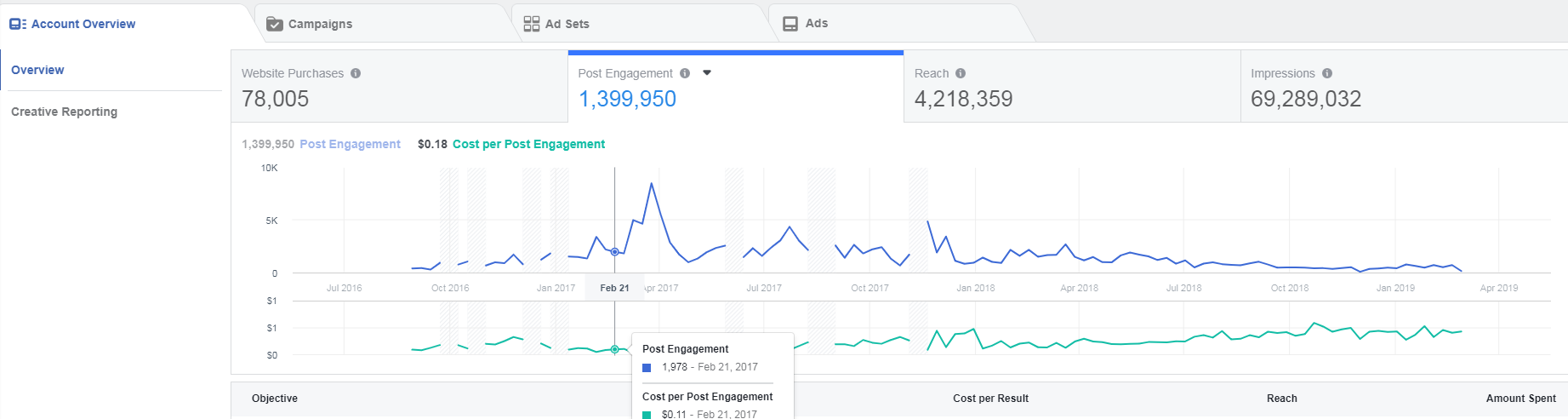
Impressions
An impression is counted on Facebook when your ad appears on someone’s screen. For example, if an ad appears on someone’s screen once a week for three weeks, that counts as three impressions.
Impressions are similar to reach, except that
Impressions and reach are basic reference points that give you an idea of how often your ads are appearing and being viewed. The additional metric of estimated ad recall lift estimates how many people would remember seeing your ad.
Key Performance Indicator (KPI)
While not technically a Facebook Ads term, KPI is an important concept to understand when analyzing campaign results.
With each campaign you’ll have an objective, and that objective will connect to one primary result. That specific result is the KPI of the campaign.
When you look at the account overview tab, you see the campaign objective tied to the KPI:
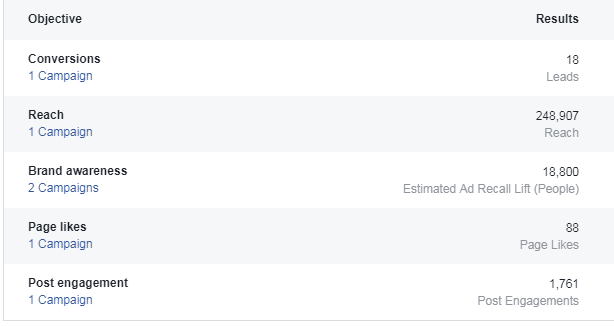
For example, in the conversions
On the campaign tab, your KPI is the results column in the performance report. If you divide results by impressions, you get your results rate, which gives you a percentage of time your conversion event happens compared to your ad’s impressions (for example, if you get 1 ad click for every 100 impressions, your result rate is 1%).
When you create a campaign, it’s important to consider the result you want to achieve because Facebook will explicitly target people likely to take that action. This same result is the KPI you’ll use to measure the success of the campaign.
Leads
Lead generation is the primary goal of many Facebook advertising campaigns.
You can convert and track leads directly on Facebook using Lead Ads, or you can track leads you generate on your website using the Facebook pixel.
Add the leads conversion value parameter to your ad set to assign a value to each lead you generate.
Lookalike Audience
A lookalike audience is an audience used to target people that have similar characteristics to one of your existing custom audiences.
For example, you create an audience comprised of your website customers. A lookalike audience will target people who are similar to people in this audience and therefore more likely to buy.
Objective
Your Facebook ad objective is what you want to achieve with your advertising.
Each campaign you create should relate to a specific business objective.
For example, if you want to create more brand awareness, your campaign objective would be reach. The KPI (key performance indicator) you track could be ad lift recall.
Or, if your business goal is transactions, your campaign goal would be website sales. Your KPI is sales attributed to your ads.
Offline Conversion Tracking
Offline conversion tracking is a method for attributing offline conversions (like in-store sales) to a Facebook ads campaign. This is done on the events manager and requires uploading data from offline events to correlate with your ad campaign.
Outbound Clicks
These are clicks that take Facebook users off Facebook and to
Pixel
The Facebook pixel is a piece of tracking code you put on your website. You must have the pixel in place to track website behavior you want Facebook to attribute to your ads.
Placement
A placement is the location where your ad is shown. Ads may show in Facebook’s mobile News Feed, desktop News Feed and right column. Ads may also show on Instagram, Audience Network, Instant Articles and Messenger.
(Ad) Post Engagement
An ad post engagement is any action a person takes on your ad. This is not necessarily your targeted result or KPI, but it does indicate if your content is connecting with your target audience.
You can see engagement metrics at all levels, from the overview of your entire account to individual ads.
Potential Reach
When you target an audience in your ad set, Facebook will give you an audience definition (from specific to broad) and an estimate of the potential number of people who will see your ad.
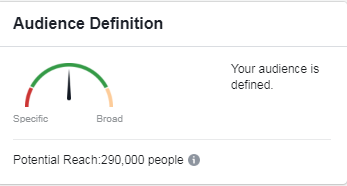
These estimates are a guideline for understanding your potential audience, but they are not meant to restrict your decision to run an ad set. You may target either a specific or broad audience that has little or vast potential reach and still have a successful campaign.
Purchase ROAS (Return on Ad Spend)
This metric is your website purchases’ conversion value divided by the amount of your ad spend.
For example, if your website purchase amount is $100 and you spent $25 on ads attributed to those purchases, your ROAS is 4.
Any number less than 1 means your ad spend is exceeding your return in website purchase amount.
For eCommerce, purchase ROAS is an important KPI that directly connects to sales revenue.
Reach
The number of people who saw your ads at least once. Reach is different from impressions, which may include multiple views of your ads by the same people.
Reach, like impressions, is an estimated metric that gives you a measure of how many people were exposed to your message during the campaign.
As a KPI, both reach and impressions are approximations. No direct action is tracked, but there are awareness benefits because people may be more likely to engage with your business when they see your message.
You can also compare reach/impressions to your main KPI to analyze how many people are being exposed to your ads versus how many are taking action.
Relevance Score
This is a 1 to 10 score that estimates how relevant your ad is and how well it’s resonating with your target audience. The higher your score, the better it’s considered to be performing.
When an ad’s relevance score is high, it’s more likely to be shown to the target audience.
The score is based on how well the ad is performing, how many positive actions it’s getting (clicks, reactions, video views) and on negative feedback.
Relevance score is associated with individual ads, not ad sets or campaigns.
Video Watches
Video is effective content on Facebook that most businesses will want to take advantage of.
As a metric, video content is measured in watch time. Each time a video starts to play, it’s counted as an impression.
For campaign objectives, the main use for videos is video views and brand awareness, though you can target many other objectives with videos.
Cost per result with video watches is based on 3 second or 10 second views, meaning you pay when someone watches at least one of the amounts of time (depending on which you specify).