How To Comment As Your Business On LinkedIn
Here’s a quick hack that allows you to comment as your business on LinkedIn.
One of the best ways to get exposure and gain followers on LinkedIn is to comment on other people’s posts.
But this straightforward tactic takes a hard turn if you’re on your company page. You can’t just switch over easily to your company profile and comment under that ID.
So if you want to gain exposure by commenting on LinkedIn as your brand, you have to use this little hack. It takes an extra moment, but it gets the job done.
First, open the post you want to comment on as a new link.
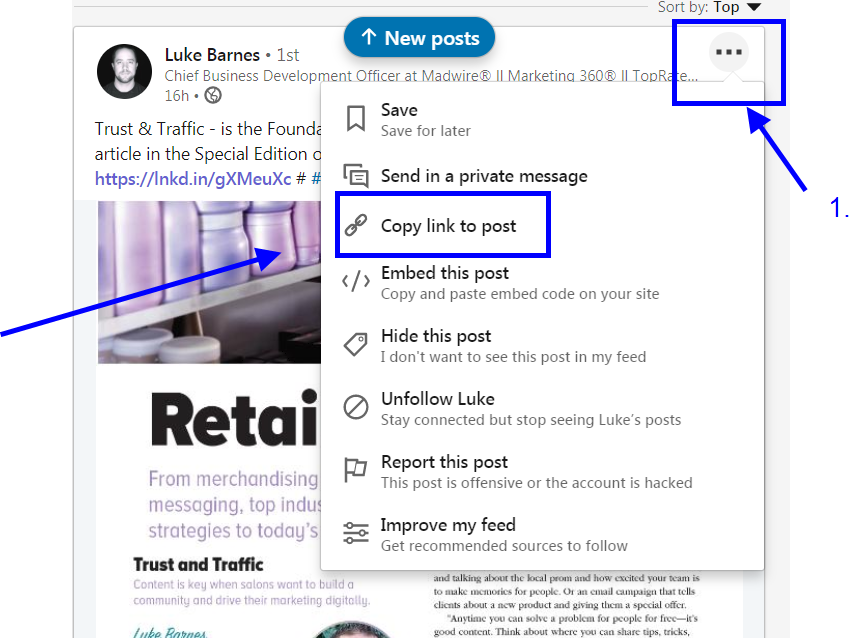
- Click on the “3 buttons” to open drop down menu.
- Copy link to post.
Then, paste the URL to open the post in a new window on your browser.
Next, add your company ID to the URL.
First, go to your company page and copy your company ID number.
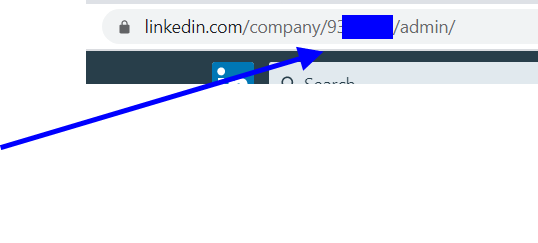
Copy that number.
No,w go to the post you opened and add this to the end of the URL:
?actorCompanyId=123456
Looks like:

Now you can go to the comments section and you’ll see you can comment as your business:

Originally published on 12/1/19