Product Update: Bulk Schedule Posts from the Social App
Now you can bulk schedule social posts right from the Marketing 360® Social app. Our new bulk scheduling action allows Social app users to quickly create weeks’ or even months’ worth of social content in just a few clicks. Save time and schedule posts with ease using this exciting new feature.
How to bulk schedule social posts
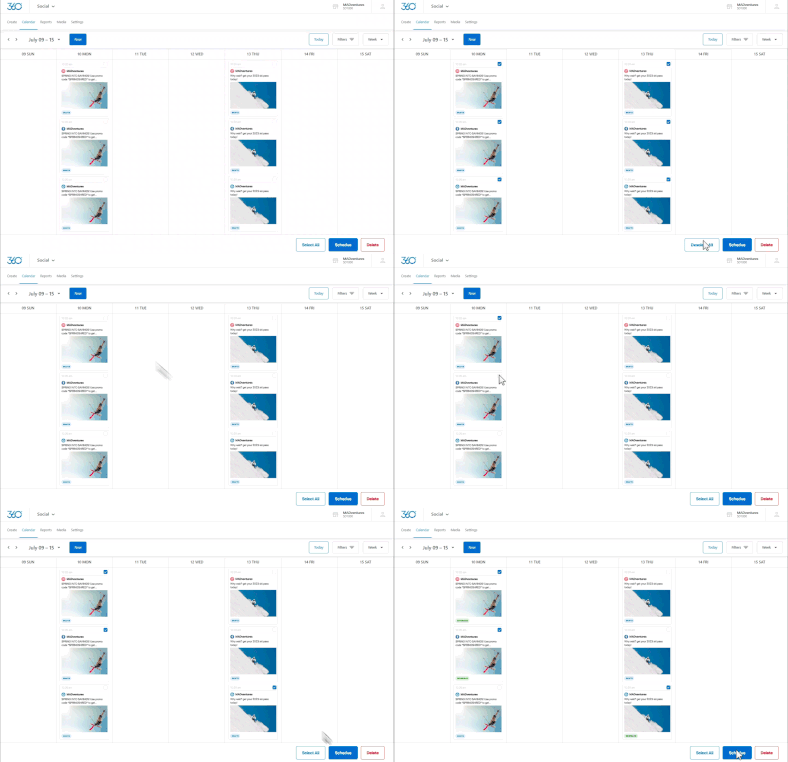
To bulk schedule posts, simply navigate to the week view of your social calendar, select the posts that you would like to schedule, or use the “Select” button at the bottom to select all “Draft” or “Pending” posts for that week.
Once you have your posts selected, click the “Schedule” button to schedule all the selected posts at once. That’s it! You now have a full week’s worth of content scheduled so you can focus on what matters most — growing your business.
You can also delete posts from your social calendar by clicking the “Delete” button.
Bulk schedule posts on specific platforms
Want to schedule out all your Facebook posts for the week? Use the Social Calendar filter to quickly filter and bulk edit posts on specific platforms.
The benefits of bulk scheduling
Busy business owners don’t have time in their day to create social posts on the fly. Marketing 360 Social makes it easy to remain active on social media without having to interrupt your day-to-day tasks. Simply schedule social posts using our Social calendar, and you’ll be on your way to building your social presence.
Try our new social bulk actions today
Get the flexibility and tools you need to stand out on social media, all from one place. Try our new bulk scheduling features today or sign up for your trial now to explore all of our marketing and business management tools. See our plans and pricing.