Introducing the new CRM Overview
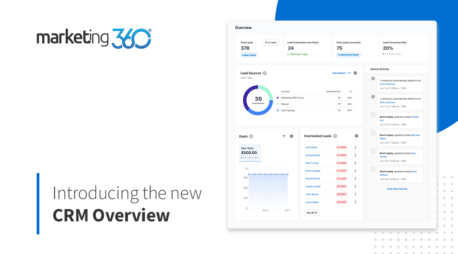
Now, you can keep track of important metrics from your Marketing 360® CRM — all from one page. The new CRM Overview lets you quickly check on new leads, upcoming tasks and more, giving you valuable insights that you can use to grow your business.
You can even choose what data you want to see front and center to customize your report and highlight the metrics that matter most.
Let’s explore what you’ll find on your CRM Overview page.
Lead Snapshot

On the top of your CRM Overview, you’ll find lead metrics right from your Leads Inbox, including your number of total leads, lead submissions this week, total leads converted and lead conversion rate.
Your lead conversion rate is determined by the percent of leads you converted to contacts by using the “Add as Contact” call-to-action.
Want to start using your Leads Inbox? Click here to learn how.
Overlooked Leads

Don’t forget about those older leads! The Overlooked Leads card will show you the oldest leads in your Leads Inbox, from oldest to newest, so that you can re-engage leads and turn them into paying customers. Plus, you can take quick actions using the overflow menu next to a lead to quickly call, message, add as a contact or archive.
Lead Sources

Are you tracking where your leads are coming from? If not, you’re missing opportunities to optimize your marketing and increase leads. The Lead Sources card lets you quickly see how your lead sources are performing over the last seven days, so you can keep an eye on your top sources.
Click on the arrow to view your Lead Sources Report, which is a comprehensive breakdown of all your lead sources and submissions generated over a selected date range.
Note: Lead Sources will pull directly from the Leads Inbox. Available lead sources include Marketing 360 Forms, Marketing 360 Call Tracking, manual lead submissions and Google Local Services Ads.
Open Tasks

We know you’re busy. Keep track of your CRM Tasks in the Open Tasks card. View more details about an open task by clicking on the task name, or click the “See all” button to navigate to the CRM Tasks page where you can view all tasks assigned to you.
Deals

Monitor the value of your open deals* so you know what’s coming down the pipeline. Click on the date range filter to show deals over a specific date range, and hover over the graph to view how much deal value you have received over the selected time period.
*Open deals are deals that have not yet reached their estimated close date set in the Deals page.
Recent Activity

See recent activity in your CRM over the past three days in your Recent Activity stream. Click “View More Activity” to load your Recent Activity page, where you can view all Activity on your account over the past 60 days.
Customize Your CRM Overview

What metrics matter most to your business? Customize your CRM Overview to highlight what metrics matter most to you. Blocks with a gear icon have the ability to be customized so you can choose what metrics you want to see, and where you’d like to see them.
Choose where to see:
- Deals
- Lead Sources
- Overlooked Leads
- Open Tasks
Experiment to see what layout looks best to you, and change it up at any time!
Get valuable insights from your Marketing 360® CRM
Start customizing your CRM Overview and leveraging your CRM data to grow your business. Sign up for your trial account today.