Introducing the new CRM Leads Inbox

Every business knows how critical leads are for business growth. From finding ways to attract new leads to nurturing existing leads into paying customers, attracting and managing leads are imperative to a business’s success.
The new Leads Inbox in the Marketing 360 CRM® helps streamline lead management by giving businesses an organized place to capture, track and nurture leads, from initial contact into lifelong customers.
Learn more about the new CRM Leads Inbox and how it can help make lead management easier.
Manage your lead’s journey from start to finish
The new Leads Inbox lets you manage your prospect’s journey from lead to customer, all from within the Marketing 360 CRM. From initial lead creation to turning a lead into a paying customer, the Leads inbox helps you stay organized by letting you view your leads and customers, all in the same app.

Capture leads from Marketing 360 Forms and Call Tracking numbers
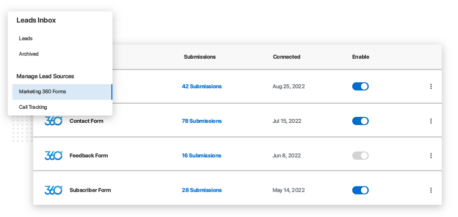
Sync your Marketing 360 Forms and Call Tracking numbers with the Leads Inbox to quickly view your form and call leads in one place.
Simply choose the forms and call tracking numbers you want to sync, and view leads from both lead sources in the new Leads Inbox. Plus, you can manually add new leads, which allows you to keep track of leads you meet while you’re on the go.
Win back old leads
As every business knows, sometimes, a lead goes cold. But, there’s always a chance you can win them back.
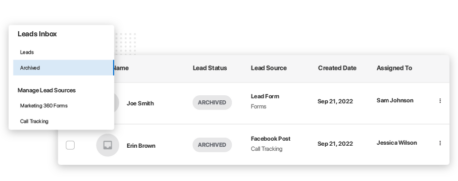
Now, you can archive leads when they go cold, and save their details in the new Archived Leads table. That way, you’ll have all their information if they become interested again in the future, so you’re ready to pick up right where you left off.
Nurture your leads
Use quick-action buttons on your main Leads table to quickly contact a lead via email or phone, and store important lead information, such as their details, notes, tasks and history, in their individual lead profile. These tools can help businesses communicate consistently with leads, and create tasks specific to leads, so that no leads fall through the cracks.

Turn leads into customers
For most businesses, leads are treated differently than paying customers. They have different questions and needs, and ultimately, your business should manage them separately to serve each type of relationship in the most effective way possible.
Businesses can use the new Leads inbox to store and nurture leads up until they become a paying customer, and then move a lead into the main CRM Contacts table when they convert.
This way, you can continue to build your relationship with them as a customer, while keeping your Leads inbox full of – you guessed it! – your most important leads.

Manage leads while you’re on the go
Download the Marketing 360® Mobile App to view new leads, quickly contact leads, and manage your leads using the mobile Leads Inbox. Never miss a lead, even when you’re on the go.
Learn more about the new Leads Inbox today
Want to start tracking, nurturing and managing leads using the new Leads Inbox? View our Leads Inbox support library to learn more, or contact your Marketing 360 representative today.