Introducing the New Marketing 360 CRM Zapier Integration
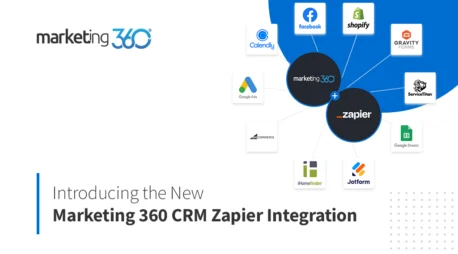
Now, you can connect over 5,000 apps to your Marketing 360 CRM using the new Marketing 360 Zapier Integration. With this integration, you can automatically create and update contacts in your Marketing 360 CRM based on actions taken across any of Zapier’s supported apps.
This exciting new connection allows Marketing 360 customers to streamline workflows, reduce time and errors from manually copying contact details across different apps, all while taking advantage of Marketing 360’s powerful marketing automation capabilities.
Learn more about this exciting new integration and how you can use it to grow your business.
How it works
With the Marketing 360 CRM Zapier integration, you have the ability to create or update a contact in the Marketing 360 CRM based on any other platform action within the Zapier ecosystem.
For example….
- Add new Marketing 360 contact when a Calendly Invitee is created
- Create a new Marketing 360 contact when you get a new customer via BigCommerce or Shopify.
- Update a contact when they fill out a Gravity Form.
- Create a new contact for leads that you receive in ServiceTitan
- Create a new contact whenever you add a row to Google Sheets
- And more
Simplify Marketing Automation
Not only does this new Zapier integration save you time and allows you to store your contacts from your other apps, all in one place — it also lets you leverage Marketing 360’s marketing automation tools to nurture more leads into customers.
For example, you can create a Zap to store leads from a Google Ads lead form as contacts in your CRM.

Then, you can automatically send those leads into a lead nurturing email journey, powered by the Marketing 360 CRM and Nurture email marketing. Nurture leads automatically and reduce manual processes to provide a better experience for leads who are interested in your business.
Not only does this save you time by automating your workflows— it takes the manual work out of following up with every new lead or contact you receive from another app.
With Marketing 360 and Zapier, you can create powerful integrations between your business’s most important apps to save you time and help you with what matters most — growing your business. Learn more about the integrations we offer and view our plans and pricing today.