What’s New in the Marketing 360® CRM

We’ve been hard at work improving the Marketing 360® CRM to make it even easier to manage your leads, customers, tasks, team, projects, sales and more.
We’ve redesigned the CRM Contacts and CRM contact profile pages with user experience in mind, added a new sync between CRM Contacts and Payments customer profiles, as well as a couple of exciting new features to make managing your customer relationships even simpler. Let’s dive in.
CRM Contacts page updates
Now, when you visit the Marketing 360 CRM Contacts page, you’ll notice a sleek new design. Easily perform key actions, such as adding and importing new contacts, searching and filtering contacts, and taking bulk actions to manage your contacts — all from a more modern CRM.

Learn more about the CRM Contacts page.
New CRM Contacts and Payments customer profile sync
CRM Contacts are now associated with Payments customer profiles! Now, whenever a CRM contact has an associated Payments customer profile, you can use the new Charge button to quickly navigate to their Payments customer profile, where you can view their recent payments, initiate new payments and more.

Improved contact profile pages
Click into an individual contact’s profile page to see the new and improved contact profile design that features:
Helpful quick-action buttons
Quickly interact with a contact using the new action buttons on their profile. Call, message, email or use the Charge button to navigate to their Payments customer profile to quickly charge them for products or services.

A dynamic sales dashboard
Quickly see a contact’s sales data*, such as their total sales, total transactions and contact rank, front and center on their contact profile. Take a deeper dive into their sales data* by clicking to their Sales tab to view their past orders and top products since becoming a customer.

*This displays sales data from the Shop App and Marketing 360 Payment Forms.
Learn more about the Sales reporting in the contact profile.
A convenient contact Notes section
Easily record and save notes about a contact in their very own Notes section. Quickly see all the notes for a contact, search and filter their notes, and export them with ease.

Learn more about taking Notes.
Updated contact profile sections
You may notice a few changes within the Tasks, Deals, Projects, Files, Lists and Sales sections in the contact profile. We’ve re-designed these to focus on the information that matters most, and to add new functionalities that make managing your contacts easier. For example:
- In Tasks, you can now mark a task as complete or incomplete on the same view.
- In Files, enjoy a simplified file upload process. Simply click the +Add Files link to add multiple files at once.
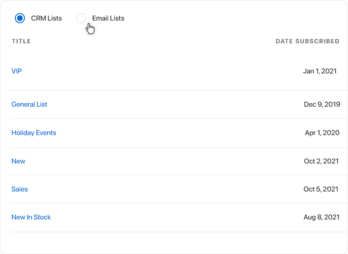
- In Lists, we’ve added the ability to toggle between a contact’s CRM lists and email lists, so you can quickly distinguish between the CRM and email lists they’re subscribed to.
A more responsive CRM experience
We’ve also improved the responsiveness of the CRM to make navigating a contact’s profile on a tablet or mobile device more user-friendly.
Learn More About The Marketing 360® CRM
Want to learn more about how to customize and use the Marketing 360 CRM to manage your business? Visit our CRM support library or reach out to our team today.