Creating Social Posts Just Got Easier
There are 3.96 billion social media users out there — that’s more than half of the global population — and on average, they’re spending 144 minutes on social media each and every day (digitalmarketing.org).
Smart marketing is about having a presence wherever your customers are spending their time, and these days, that’s on social media. Here’s the thing, though. Merely having a profile on the social platforms your customers are using isn’t enough. You need to have an active social presence.
Posting on social media can help you build awareness in your brand, connect with your community and turn followers into fans. The Marketing 360® Social app helps you do so, while saving time and energy, by allowing you to schedule out your social posts ahead of time. And, with the latest update, posting engaging, effective social content has never been easier.
Creating and scheduling social posts is easier than ever with the Marketing 360® Social app
The Social app update is packed full of incredible features that save you time and make it easier than ever to post organically on Facebook, Google My Business, LinkedIn and Instagram. Here are the new, user-friendly features to help you maximize your social presence:
Focus on one post at a time
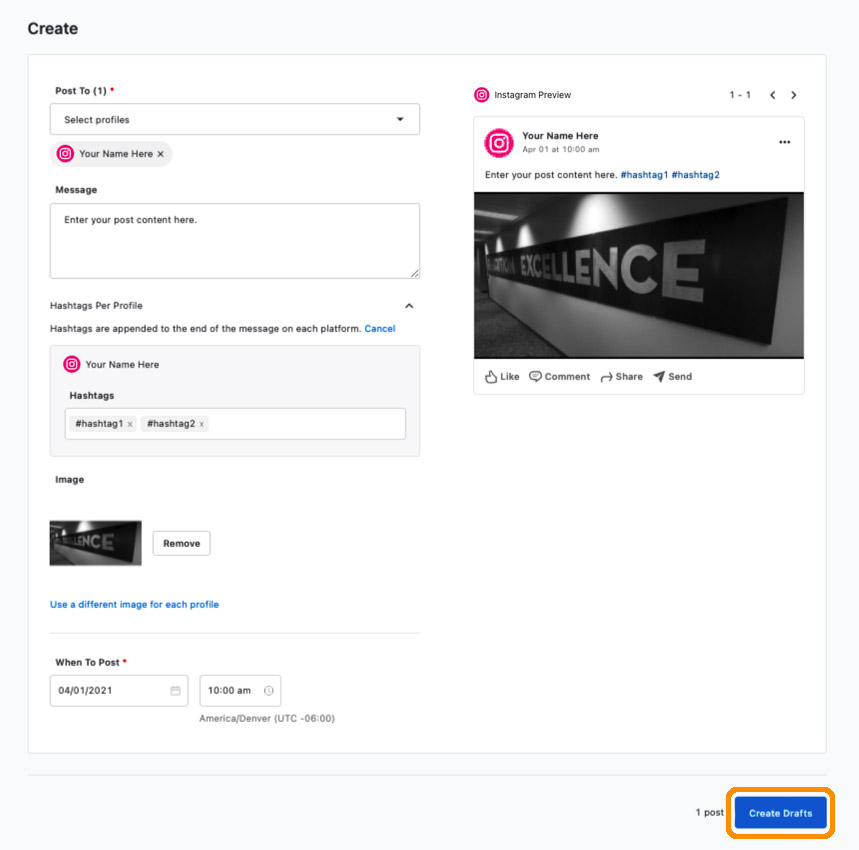
Make the most of all of your social posts by focusing on one post at a time, including adding an image, hashtags and more, to drive engagement on the selected social platforms.
Schedule multiple posts at once
Planning to be out of town or have a busy week ahead? Keep your posting schedule consistent — no matter what your schedule entails — by scheduling out multiple social posts ahead of time.
Preview your posts
Want to know what your posts will look like in your followers’ timelines? Visual previews in the desktop app allow you to see your posts, exactly as your followers will see them, on each platform.
Edit your posts in minutes
Need to correct a grammatical error or fix a typo? With the new Social update, you can quickly edit your pending social posts without having to make them drafts first. This feature is ideal in situations where final approval needs to be given before posts are published.
Boost engagement with buttons
Increase social engagement on your Google My Business posts and drive traffic to your website by adding clickable buttons through the Social app.
Give credit where credit is due
When you mention another account on Instagram, you can now add @ tags to your organic posts in the Social app, which are clickable when you preview your posts.
Post pictures straight from your phone
Save time and effort by taking beautiful social images with your smartphone and posting them straight to the Social app. There’s no need to upload images to your computer, and you can easily add unique images to different platforms.
The latest update to the Social app makes it easier than ever to create organic content that’s engaging, effective and helps you stand out from the crowd. See plans and pricing.